Smartphone Product Photography for Crafters: The Complete DIY Lighting & Staging Guide
When shopping online for handmade goods, customers cannot touch the ceramics, feel the texture of hand-loomed textiles, or smell a poured soy candle. Your product photos have to do 100% of the heavy lifting.
Industry statistics reveal that over 90% of online shoppers rate visual content as the single most influential factor in their purchasing decisions. Poor lighting or grainy photos can make a $100 heirloom quality piece look cheap, while clean, crisp imagery builds immediate trust and justifies premium pricing.
The best news? You do not need a $2,000 DSLR camera, expensive studio strobe lights, or a professional photography degree. Modern smartphones pack incredible camera sensors—when paired with proper natural lighting techniques and simple staging rules.
Lighting Comparison: DIY Setup Matrix
Lighting is 90% of photography. Before spending money on equipment, review how different lighting environments affect your handmade product photos:
| Setup Type | Best For | Pros | Cons | Estimated Cost |
|---|---|---|---|---|
| Natural Window Light + Bounce Board | Ceramics, Candles, Jewelry, Woodwork, Textiles. | Soft, realistic color rendition; warm professional aesthetic; zero harsh shadows. | Weather-dependent; limited to daytime hours. | $5 (Dollar store foam board) |
| Overhead Room Lights (Incandescent/Ceiling) | Not Recommended | Convenient; always available. | Creates yellow/orange color cast; harsh unflattering shadows. | $0 (Avoid this) |
| Direct Outdoor Sunlight | High-contrast lifestyle shots (e.g. tote bags in outdoor setting). | Vibrant colors; punchy highlights. | Blows out highlights; creates strong dark shadows on fine details. | $0 |
| Tabletop Lightbox / Tent | Small jewelry, pins, resin charms, miniatures. |
Step 1: Master the Natural Window Light Setup
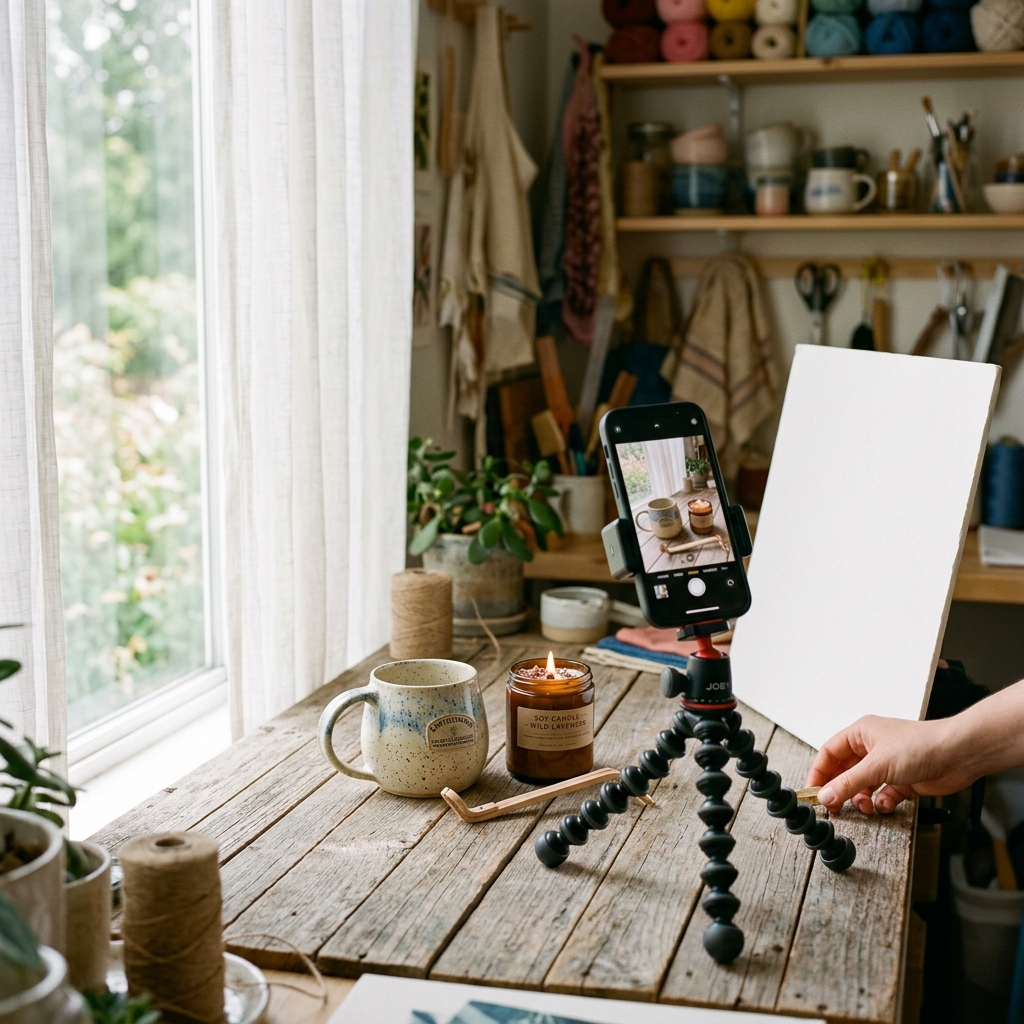
The single easiest way to get professional-looking product photos at home is the Side Window Light Method.
How to set up your home studio:
- Find a large window: Choose a north- or east-facing window that gets plenty of bright indirect light (avoid direct sunbeams falling across your desk).
- Position your table at 90 degrees: Place a small table perpendicular to the window so light washes across your product from the side. Side lighting emphasizes surface texture, depth, and handmade craftsmanship.
- Use a White Foam Bounce Board: Opposite the window, prop up a $5 white poster board or foam core board. This acts as a reflector, bouncing soft fill light back onto the shadowed side of your product so details stay visible.
- Diffuse harsh light: If direct sunlight shines through your window, tape a thin white bedsheet, translucent shower curtain, or parchment paper over the glass to soften the beam into a softbox glow.
Step 2: Choose Backdrops That Complement, Not Distract
Your backdrop should frame your creation—never compete with it for attention.
Top 4 DIY Backdrop Ideas:
- Seamless White / Neutral Poster Board: The classic standard for catalog hero shots. Creates an infinite backdrop when curved smoothly behind the item (a "sweep").
- Natural Aged Wood: Reclaimed barn wood, butcher block countertops, or wood vinyl tiles add organic warmth to rustic crafts like ceramics, candles, and leather goods.
- Linen & Woven Fabrics: Soft wrinkled linen or neutral canvas cloths add subtle tactile depth for jewelry, apothecary, and bath products.
- Slate, Marble & Tile: Matte ceramic tiles from your local home improvement store ($3–$8 per tile) make sleek, high-end props for skincare or gemstone jewelry.
Golden Rule: Avoid busy patterned tablecloths or clutter in the background. If a background element doesn't help tell the story of the item, remove it.
Step 3: Optimize Your Smartphone Camera Settings
Modern iPhone and Android cameras are incredibly smart, but default automatic settings often ruin product shots. Tweak these settings before pressing the shutter:
- Turn ON the Camera Gridlines: Go to your phone camera settings and enable gridlines. Use the 3x3 grid to keep horizons level and align your product along the rule of thirds.
- Wipe your lens! Skin oils on phone camera lenses create blurry, hazy photos. Give your camera lens a quick wipe with a microfiber cloth before shooting.
- Use 2x Optical Zoom (Not Ultra-Wide): Standard 1x smartphone lenses have subtle wide-angle distortion that bends straight edges. Step back slightly and switch to 2x optical zoom to capture true product proportions without fish-eye warping.
- Lock Focus & Adjust Exposure: Tap your product on the phone screen to lock focus (AE/AF Lock). Drag the small sun icon up or down to adjust exposure until highlights are crisp without being blown out.
- Never Use Smartphone Flash: Built-in phone flashes create harsh white spots and unnatural glares. Rely strictly on natural window light or diffuse continuous lights.
Step 4: The 5 Essential Photo Angles Every Product Listing Needs
To eliminate buyer hesitation, aim to include at least 5 different photo types in every product listing:
┌─────────────────────────────────────────────────────────────┐
│ 1. HERO SHOT (Clean Eye-Level Cover Image)                   │
├─────────────────────────────────────────────────────────────┤
│ 2. SCALE / CONTEXT SHOT (Held in Hand or Beside Known Item) │
├─────────────────────────────────────────────────────────────┤
│ 3. MACRO DETAIL SHOT (Zoomed on Stitching, Texture, Stamp)  │
├─────────────────────────────────────────────────────────────┤
│ 4. LIFESTYLE SHOT (In-Use Setting: Coffeetable, Shelf, Desk)│
├─────────────────────────────────────────────────────────────┤
│ 5. PACKAGING SHOT (Boxed, Wrapped with Thank-You Card)      │
└─────────────────────────────────────────────────────────────┘
- The Hero Shot: The main thumbnail photo. Clean, centered, brightly lit on a neutral background.
- The Scale / Context Shot: Show the product held in a hand or placed next to everyday objects so buyers immediately understand its dimensions (e.g., a mug held by a handle or a tote bag worn over a shoulder).
- The Detail Close-Up: Macro shot focusing on handmade details—the glaze drip on pottery, hand-stitched leather seams, or maker signature stamp.
- The Lifestyle Shot: The product styled in its natural habitat (e.g., a candle lit on a cozy coffee table next to a book). This helps customers visualize the item in their own home.
- The Packaging & Gift Shot: Show how the item arrives wrapped. Showing eco-friendly tissue paper, custom boxes, or cotton drawstring bags boosts gift-buyer conversion rates significantly.
Step 5: Simple Mobile Editing (Without Over-Filtering)
Editing is meant to enhance reality, not fake it. If your edited photo looks bright orange on mobile screens but the real item is dull brown, you will face high customer return rates.
Best Free Mobile Editing Apps:
- Adobe Lightroom Mobile (iOS & Android) — Industry favorite for precise color correction.
- Snapseed (iOS & Android) — Excellent free tool for selective brightness adjustments and white balance tweaks.
3-Step Editing Checklist:
- Fix White Balance (Temperature): Adjust the warmth slider until white backgrounds look clean white rather than yellow or ice-blue.
- Bump Up Shadows & Lower Highlights: Lift dark shadows slightly to reveal product details, and lower highlights so white ceramic or shiny glass doesn't glare.
- Add Subtle Clarity & Sharpening: Increase clarity by +10 to +15 to make hand-carved textures pop crisply.
Frequently Asked Questions
Should I use a lightbox or natural window light for handmade crafts?
For most handmade, organic, or cozy items (like ceramics, knits, leather, candles, and woodwork), natural window light produces a much warmer, inviting, and authentic feel. Lightboxes work best for uniform mass items, pins, or tiny metallic jewelry where reflections must be controlled.
Why do my product photos look yellow or blue on my phone?
This is caused by incorrect White Balance. Indoor overhead light bulbs cast a yellow/orange hue, while shade or overcast windows cast a cool blue tone. Use a free app like Lightroom Mobile or Snapseed to adjust the "Temperature" slider until whites appear neutral.
What image aspect ratio is best for online handmade listings?
A 1:1 square ratio (2000 × 2000 px) or a 4:5 vertical portrait ratio (2000 × 2500 px) works best across web marketplaces and mobile devices, ensuring your product fills the screen on smartphones.
Ready to Show Off Your Craft?
You don't need a high-end photography studio to build a high-converting handmade brand. By combining soft window light, clean neutral backdrops, and your smartphone, you can showcase the true beauty of your craftsmanship.
Looking for a platform designed for independent makers? Explore for more creator guides and start growing your handmade business today.